
LSC#69: Not another productivity hack 🙄 🤔

Welcome to this week’s #LSC edition: your weekly dose of tiny tweaks that lead to big improvements.
Before we dive in, a quick note: I’ve skipped the last 2-3 editions.
A pretty nice mix of low motivation, the sequels of a broken bone and a (pretty well deserved if you ask me) trip to Mexico are the ones to blame.
But hey, I’m back, and well, I still need to figure out the motivation part, and maybe I’ll dive deeper into that in a future issue.
But this is #LSC69, and today we’re going full anti-overwhelm mode.
Just two unsexy but powerful tech tricks I use every single day to make life less annoying and a bit more frictionless.
If you’re tired of juggling windows and typing your email for the 73rd time, this one’s for you.
Ready to save time (and your sanity)? Let’s roll.
Today’s summary:
💡2 digital tricks I actually use every day
✨ The unsexy tech tips that save me time

We’re constantly bombarded with “life hacks,” productivity advice, and 10-step systems for doing things better.
I’m guilty of it too. I often share what’s worked for me, assuming we’re all starting from the same place. But that’s rarely true.
So this week’s LSC is a little different. Just 2 simple tech tips I use every day to make life less annoying and a bit more effortless.
Not to improve your productivity (note I didn’t say be more productive but improve your productivity, which is not entirely the same) or consistency, which is perhaps the main goal of this #LSC, but to save time, remove friction, so maybe you can say:
“Wait… why didn’t I do this earlier?”
🖥️ 1. Split screen for smooth multitasking
When I’m writing and need to reference a doc, or when I’m copying content from one place to another, or specially when I’m working remote and don’t have a second screen…
Split screen saves me.
If you’re on Mac, the built-in split view is pure gold. You can have two apps side-by-side, one on top of the other, or even a 4-split view if you're feeling spicy.
🧠 Why it matters:
It helps you stay focused, cuts down on tab-switching, and gives you a mini dual-monitor setup without the extra screen.
⚙️ How to do it:
I could actually explain this in written form (and probably will), but there’s a saying in Spanish that goes like “a picture is worth a thousand words,” and I believe the same saying exists in English, right?
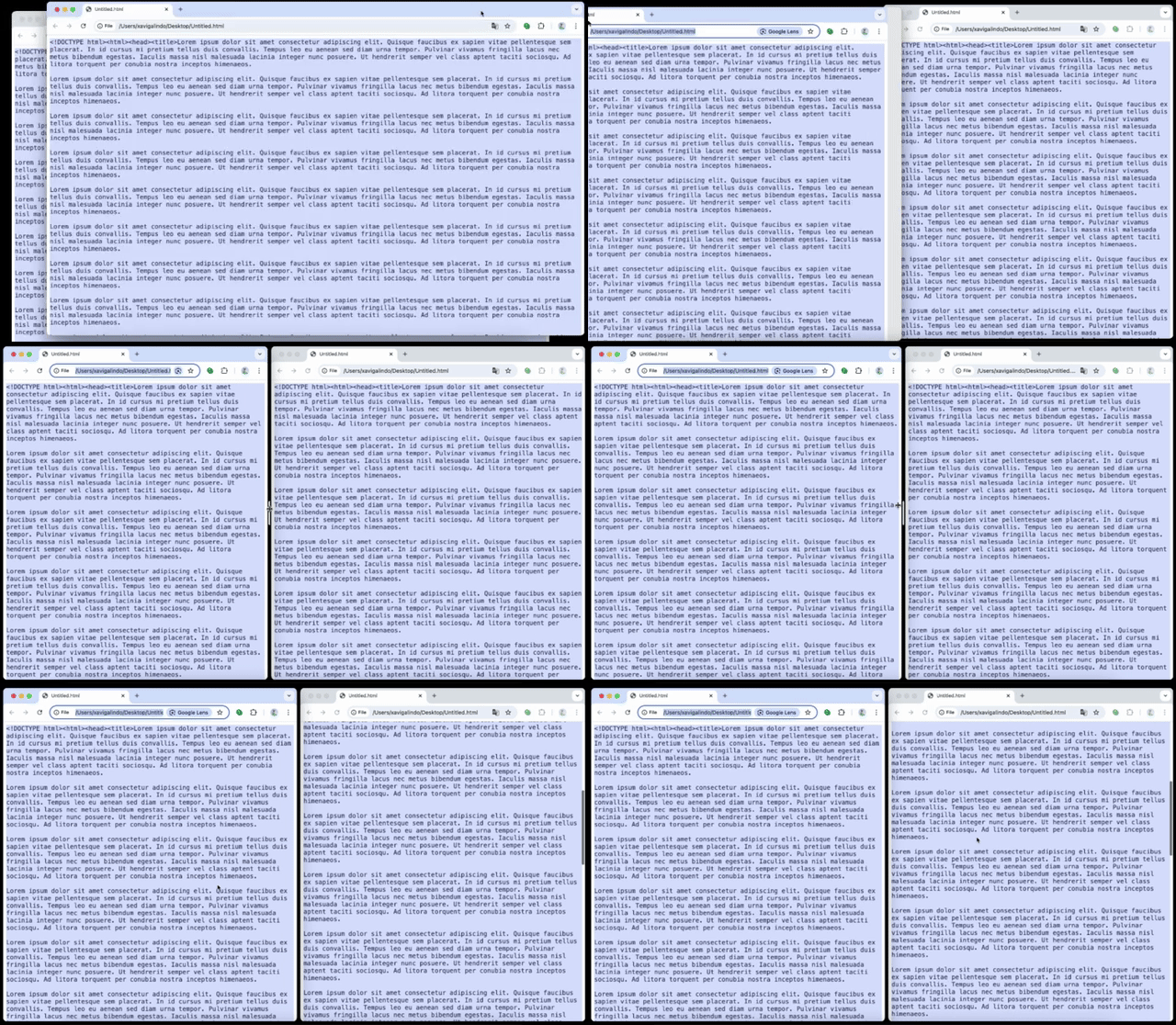
And for those too lazy to watch the 11 secs gif:
Hover over the green button in the top left corner of a window
Choose “Tile Window to Left/Right of Screen”
Select the second app you want to view
👉 Bonus: It also works with apps like Notion, Word, browsers, Zoom, etc.
In case you don’t have a Mac and you’re working from a Windows device, here’s how to do it (I didn’t try it myself but I assume it’s pretty straightforward).
⌨️ 2. Auto-text replacement
How many times a week do you type your email? Or a URL? Or your phone number?
Here’s a tiny trick that saves me dozens of micro-minutes each week (how long is a micro-minute? I don’t know, I just made it up, but it sounds like not much unless you pile them up and end up having a lot of micro-minutes) and removes the mental friction of repetitive typing.
🧠 Why it matters:
Attention: this replaces autocomplete/autofill, which is, let’s say it, inconsistent at best. It actually works everywhere: docs, emails, forms, websites, WhatsApp, Telegram…
⚙️ How to do it (Mac):
Open System Settings → Keyboard
Scroll to Text Replacements
Hit the "+" to create a shortcut
Example:
Replace:
@@With:
youremail@domain.com
Every time you type @@ + space, it gets replaced with your email.

⚡️ Pro tip:
I use @@ for personal email, @@@ for work, and similar combos for addresses, phone, and links.
🔐 A further tip related to this: save or configure your addresses either in your browser (meh security) or a password manager (yay security). This way, whenever you need to enter your address, your system will do it for you. Is it a life changer? Well, on a scale from 1 to 10, it’s a solid 6 if you ask me!
✅ Your action step
Pick one of the two tips above and try it today.
None of these are earth-shattering, not gonna lie.
But they will save you clicks, time, and low-key frustration. And over time, that’s the stuff that adds up.
💬 Daily tips from the trenches: Falco Huhold

By popular demand (of a total of 2 people, one being me), the Daily Tips from the Trenches section is back.
This week’s tip comes from Falco. He's so amazing (in his own words, I am literally copying the stuff he shared with me)and he helps mobile apps achieve a positive ROAS.
Jokes aside, I worked with Falco for a few years, and during that time, I saw hium going from “doing things here and there” (pretty well btw) to becoming a pivotal part of the team, adding a ton of value to every project he touched. A while ago, he started exploring both the freelance and remote life, and I couldn’t be happier that he’s thriving in such a wild environment.
This week, Falco is sharing how to find better balance during your time of:
Take more (and smarter) breaks
Holidays are great, but did you know their effects on your well-being wear off within 1–2 weeks?
Instead of waiting for your next big (or annual) holiday, try taking shorter, more frequent breaks.
Try this:
Escape for a 2–3 day weekend
Alternate between exploring new places and revisiting familiar ones
Familiarity kills FOMO and actually helps you relax 💡
Ask yourself: Am I doing this [activity] to enjoy the experience or just to get the perfect Instagram shot?
If you're exploring: Take 10 minutes to absorb the experience before snapping a picture
My own routines changed when I became self-employed. I now follow a rhythm of three focused workdays, followed by 1–2 “weekend” days, and every 6–8 weeks, I take a five-day break. (I’m very grateful to live by this rhythm!)
My tip: Find your rhythm. Take conscious breaks [from work and maybe your phone]. Watch your productivity and well-being spike. 😊
🎉 Some extra things because, well, it’s me
🗺️ Instead of Instagram (or any other social media app), how about spending 5 minutes on a game where you learn something completely useless — but that could help you crush a trivia night?
Yes, Geography games are the best!
🌈 No love, however brief, is wasted: A reflection about learning skills that might seem useless… until they’re not.
🚴♂️ Now that I can’t a) ride a bike and b) travel as much as we did last year, this video about a couple traveling from the southern to the northern tip of Asia feels like both reliving past adventures and realizing how deeply I love Southeast Asia.
📊 Data Dive
And to finish the newsletter, let’s take a little look at the #LSC performance (yes, a bit of #buildinpublic here):
637 Subscribers → Last week we were 630
X Unsubscribed → Didn’t track this metric over the last 3 weeks, sorry about that
51% Open rate → You already know the goal here, right?
Before leaving, here you have are a few things you can do to help me:
Share this newsletter with someone you think will like it.
Reply to this publication.
If you’re on Substack, like this publication, re-stack it, move it around…
And now, for good: Keep an eye out for the next LifeScore Chronicles—something exciting is just around the corner. 🚀
Until next week, stay safe and healthy!
Bienvenido de vuelta! Oye, y más tech tips en el fututo, porque molan mucho… Yo la pantalla partida la uso #tolrato, pero lo otro voy a empezar a usarlo en 3, 2, 1.
Glad to find you back and great article for your reappearance!